

This is for a deposit your client sent through Venmo, Zelle, Cash App or your own payment link. If a client paid you and never reported it, record it yourself.
Check your own payment app first. Find the transfer.
Then open the request and press Record payment received. It's under the times you sent. On Home, while a client is holding a time and hasn't paid, their row shows Mark it received, which opens the same step.
Under Where it landed, pick Venmo, Zelle, Cash App or Payment link.
Check Amount that landed. Cake fills in the deposit. Change it to what arrived, even if it's not what you asked for.
If Rosa is holding a time, Cake keeps that one. If nothing is held and your times are still out, a full payment needs a time: pick the one Rosa is taking under Session time. A part payment records without one.
Tick that you saw the transfer, then press the Record payment received button in the sheet.
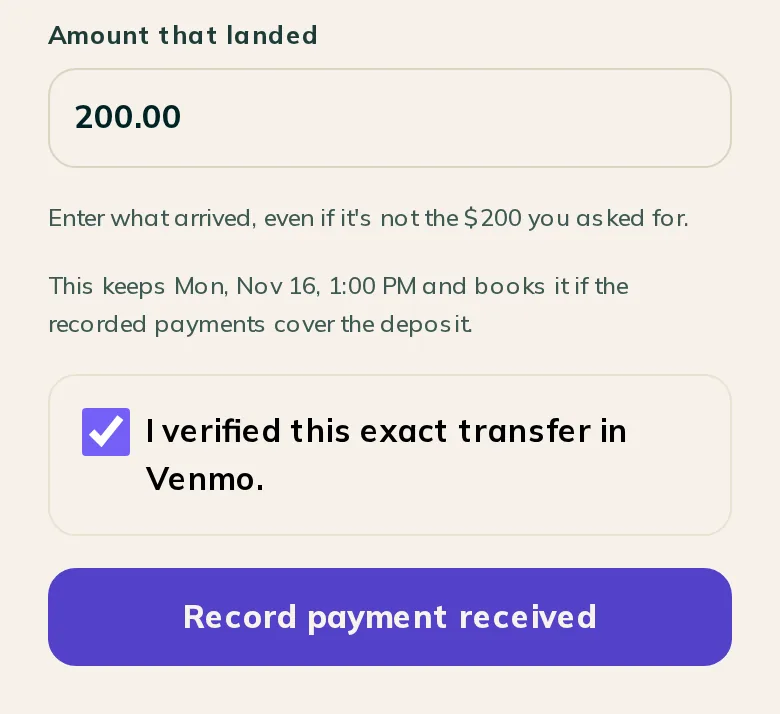
Note: Cake can't see this money, so recording it is your word it arrived. Cake doesn't check Venmo, Zelle or Cash App for you.
When the payment covers the deposit and a time is held or chosen, the session books. Rosa gets the booking confirmation.
- No times are left: The request reads Payment received. Rosa is told fresh times are coming and the deposit stays applied. Press Send fresh times.
- Only part of it came in: Cake records what landed and books nothing. The request says Part of the deposit is in. Rosa is told what's in, asked for the rest, and told not to send the whole deposit again. When the rest lands, press Record the rest.
- The time was taken: The payment is still recorded, and nothing books. Choose a current time or send fresh times.
Rosa already reported the payment.
Confirm it under Deposit check instead. Where a deposit stands has the steps.
Rosa reported it, and the hold ran out.
Press It landed, record it on the request or on Home. Then send fresh times.
Cake says a card checkout is still open.
Wait a minute and try again. When Stripe tells Cake a card payment landed, the deposit records itself, and the button goes away.
- The money never arrived: Press Correct this record, then This deposit never arrived. No money moves, and Rosa is told it wasn't received. After the session is booked, the record can't be corrected in Cake, so write to support@cake.ink.
- You sent the money back: Send it back through the same app first. Then press Record money returned, enter the amount, and press Record the return. Cake records it and moves no money.
- You pressed it twice: Cake keeps one record.
To confirm a deposit your client reported, read Where a deposit stands.
To report what you collected when a session ends, read Wrap up a session.
Write to support@cake.ink or tell us in Discord. A screenshot of the request helps us see what you see.