All product updates
Your page opens on your photo
A new Profile group in Settings edits your page. Approve has one list of time offers. Book anyway books a time over a Google Calendar overlap.
Your page opens on your photo
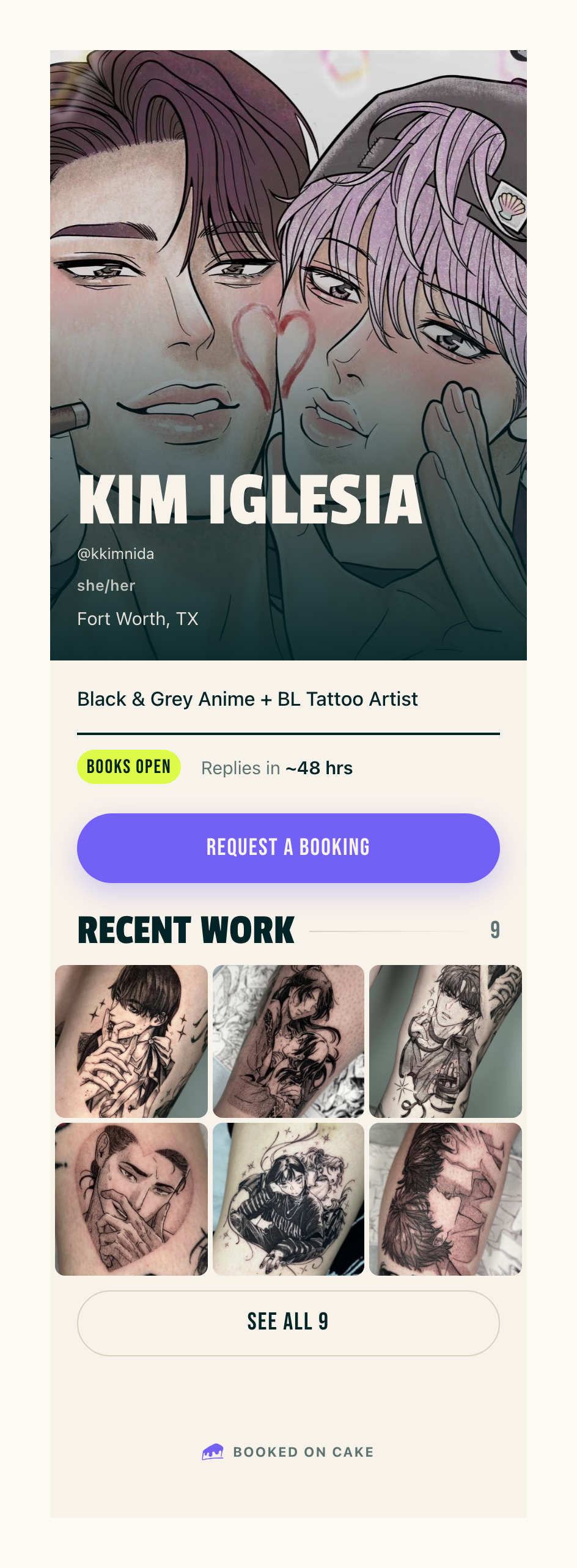
- cake.ink/@yourhandle shows your profile photo full width, with your name set large over it. Your @handle, pronouns, city and styles sit under your name.
- Under your bio, a row shows Books open or Books closed, From and your starting price, and Replies in ~N hrs. Request a booking comes next, then Recent work with a count of your pieces.
- With more than six pieces, Recent work shows six and See all opens the rest.
- Policies & booking and FAQs open in place.
- When your books are closed, the page says Books closed and shows no Request a booking.
Settings has Profile, Booking and Account
- Settings groups its rooms under Profile, Booking and Account. The Profile group holds Profile, Work, About page, and Policies & FAQs.
- The Books open switch sits at the top of the Profile room and saves when you flip it.
- Under Hero photo, drag your photo in the Desktop and Phone frames to place it, then press Save. Reset position puts it back.
- Under Look, pick Match the visitor's device, Light or Dark.
- Show your starting price and Show your reply time decide whether From and Replies in appear on your page.
- In Work, the arrows move a piece earlier or later. Your page follows that order.
Approve has one list of time offers
- When you approve a request, Time offers opens on the session lengths 2 hrs, 3 hrs, Half day, Full day and Custom.
- Every time you pick is one row in one list. + Add a time opens a sheet, and the time you add lands in the list marked Added.
- To offer a day you're usually closed, pick Full day, then + Add a time. The sheet says, for example, "Sundays are usually closed for you." Start time and End time fill in with your usual hours. Edit them, then press Add this open date.
Book anyway books over a Google Calendar overlap
- When a time you offer on Approve overlaps your Google Calendar, Cake shows Overlaps: with the event's title, or Busy in Google Calendar, then its calendar and the time.
- Press Book anyway to keep the time. When the client picks it, Cake checks Google again and books over the overlap you accepted.
- Quick add, Reschedule this session, Change length and Record payment received check Google too, name any overlap and offer Book anyway.
- On a day you're usually closed, Quick add shows Book anyway in place of Book it now and books the hours you type.
Choose how far ahead Cake suggests times
- In Settings, Availability and calendar, under Your week, Booking suggestion window sets how far out Cake suggests open times. Pick 1 to 104 weeks or 1 to 24 months, then press Save changes. It starts at 3 months.
- When no open day in that window has room, the message on Approve names the window.
Everything on a client's page opens
- In People, on a client's page, every piece card and every Records row opens, closed requests included.
- A session row opens that session's page, where Reschedule and Cancel session sit. Other rows open the request.
- A request page lists the client's other requests under "{first name}'s past sessions", newest first, each with its photo, date and status.
The approval email opens with "You're approved"
- When you approve a request, the client's email opens with "You're approved" and, under it, "{your first name} said yes to your booking request."
- When you added the client yourself, it opens with "{your first name} sent you a time", or "{your first name} sent new times" for later times, with no approval line. The subject stays the same.
Smaller fixes 6 lines
- When the latest email Cake sent a client bounced, a coral Email bounced badge shows on the Requests card and at the top of the request page. A later email that reaches the client clears it.
- In the Nudge sheet, Write to {first name} yourself sits under Send to {first name} and opens that client's Chat thread.
- Each photo question on your request form holds its own photos, and you see them as pictures on the request. In Settings, Your intake, each photo question has Up to how many photos, from 1 to 8.
- Buttons on request cards in Requests and Home are at least 44 pixels tall.
- When Cake can't confirm it made your Cake sessions calendar in Google, it stops and Settings, Availability and calendar shows Try again. When Cake made extra empty Cake sessions calendars, that screen can offer Remove N empty calendars.
- On the demo at demo.cake.ink, a reminder link label that holds a web address gets the studio's refusal: "Link label can't hold a link. Give it a name instead."